For customers
Your quote: review it, accept it, and book with a deposit
4 min read
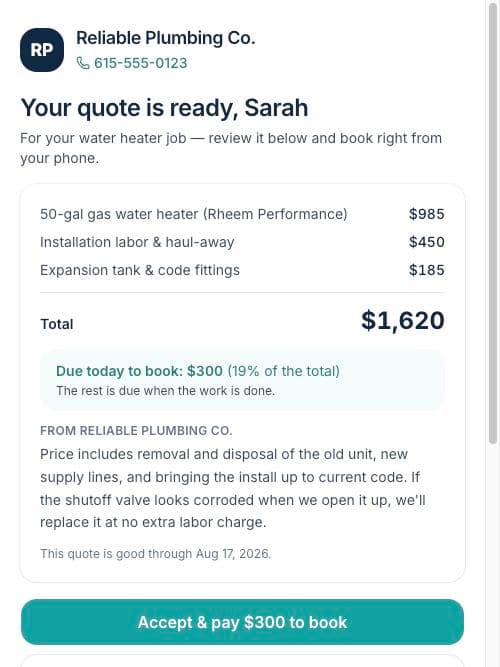
When your contractor sends a quote, you get an email with one button. It opens your project page with the full quote: every line item, the total, any notes — and exactly what's due today versus when the work is done.
Accepting and paying
- 1Read through the lines and the contractor's notes — questions? There's an Ask a question button that goes straight to them.
- 2Tap Accept. If there's no deposit, you're booked — the contractor is notified instantly.
- 3If there's a deposit, a secure Stripe payment page opens: Apple Pay, Google Pay, or card. Your contractor never sees your card details.
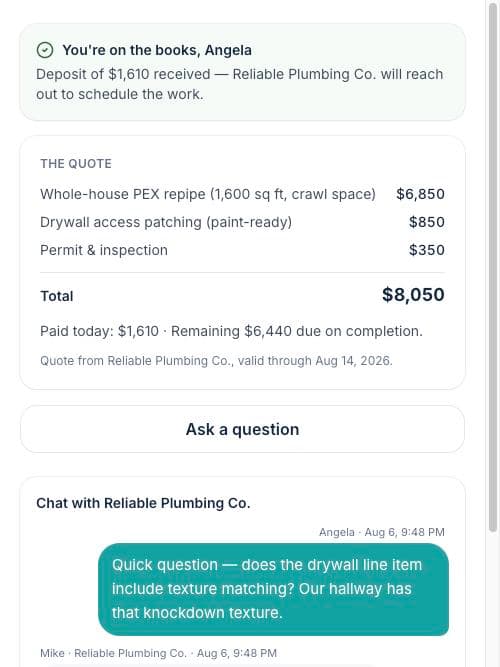
- 4You'll get a receipt by email, and your project page shows what you paid and what's left for completion.
Other choices
- Not ready? The quote shows how long it's valid — your link keeps working the whole time.
- Need a change? Ask a question — contractors revise quotes all the time.
- Not going forward? Decline with one tap; there's no penalty and no awkward phone call.
Tip: Got interrupted during payment? No problem — reopen your link and the Pay the deposit button picks up right where you left off.