For business owners
Deposits and payouts: getting paid through MeasuredQuote
6 min read
Deposits are how a "yes" becomes a booking. When a customer accepts a quote with an upfront amount, they pay it right on their phone through Stripe — and the money goes straight to your bank account. MeasuredQuote never holds your funds.
1. Set up payouts (one time, about five minutes)
- 1Go to Settings → Deposits & payouts.
- 2Tap Set up payouts. Stripe's secure onboarding opens — have your bank details handy.
- 3Answer Stripe's identity questions (this is the same verification every payment company requires).
- 4When you're done you'll land back in MeasuredQuote with a green Ready badge.
Tip: Until payouts are set up, you can still send quotes — just without an upfront amount. The moment Stripe verifies you, deposit quotes unlock.
2. Add a deposit to a quote
In the quote builder, set "Upfront to book" as either a dollar amount or a percentage of the total. Customers always see it both ways — "$300 (19% of the total)" — so there's never confusion about what's due today and what's due on completion.
3. What the customer experiences
- 1They open your quote from the email and tap Accept & pay to book.
- 2Stripe's payment page opens — Apple Pay, Google Pay, or card. You never see their card number, and neither do we.
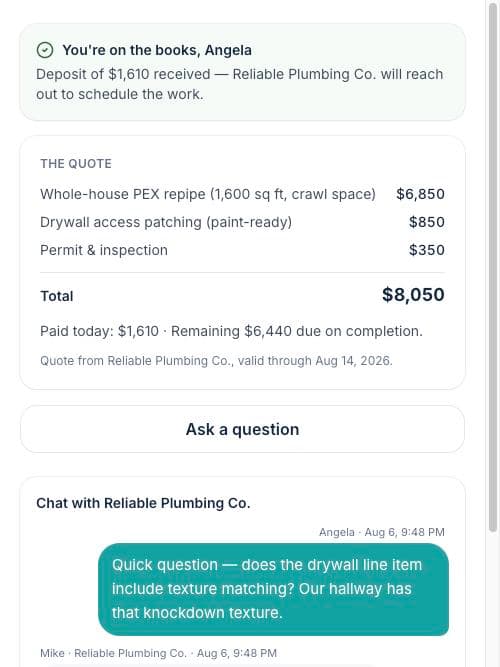
- 3The moment payment lands, the project flips to Won, they get a receipt by email, and your whole team is notified.
Common questions
- When does the money arrive? Stripe pays out on its standard schedule — typically 2 business days after the charge.
- What if they close the payment page? The job stays accepted with the deposit pending; the customer's link offers a Pay the deposit button to pick up where they left off.
- Are there processing fees? Standard Stripe card processing applies to deposits, same as any card terminal.