For office staff & field techs
Chat that's really email: talking with customers
6 min read
Customers don't install apps. So every chat message you send goes out as a branded email from your business, and when they reply — from Gmail, Apple Mail, wherever — the reply lands right back in the project's chat. One conversation, no matter where each side types.
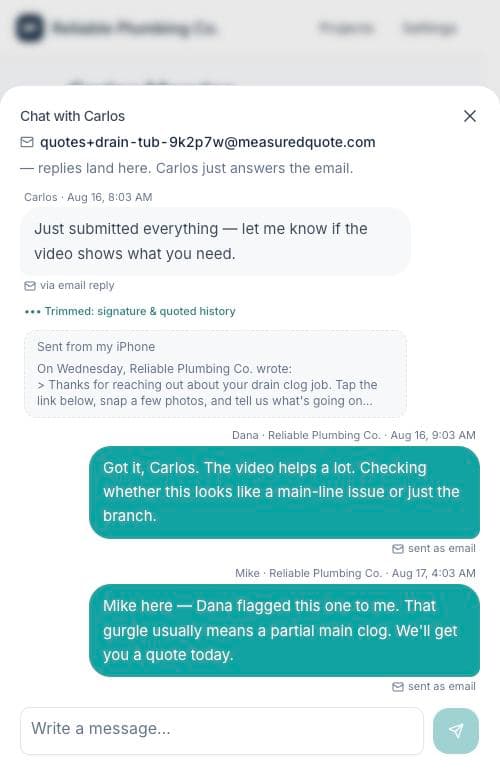
How to read the thread
- "sent as email" under your messages: it went to the customer's inbox as a branded email from your business.
- "via email reply" under theirs: they answered from their inbox, and it landed here automatically.
- "Trimmed: signature & quoted history": we tuck away the "Sent from my iPhone" and quoted-reply clutter — tap to see the full original any time. Nothing is thrown away.
Replying from your own inbox
When a customer writes in, everyone on the team gets an email with the full message. Just hit reply in your email app — your answer is attributed to you, lands on the project thread, and forwards to the customer as a branded email. You never have to open the app to keep a conversation moving.
Held messages
If an email comes in from an address we don't recognize on that job — say, the customer's spouse — it's held for review instead of landing on the thread. You'll see it at the top of the chat pane with two choices: Add to thread or Discard. Either way, the original email is kept.
Tip: Every message is attributed by name — customers see "Dana · Reliable Plumbing Co." So jump into any conversation; they'll always know who's talking.